Updated February 2026
Processing Jobs That Pass the Test: Cannabis Compliance in Metrc
Please note: These common errors and best practices may not apply in your state, so it is important to follow your state’s specific rules and regulations.
Managing cannabis operations involves tracking various processes, especially when it comes to processing, production, and packaging products. To stay compliant with state regulations, the Processing Jobs functionality tracks the processing and packaging of specific batches of products and processes within the Metrc system. Even small errors in the process can lead to compliance issues that could negatively impact your business. Let’s explore when to use the Processing Job feature and review best practices for implementing it correctly.
The basics: Creating a Processing Job
Metrc’s Processing Job feature helps licensees track the processing and packaging of specific products and processes—especially when items are combined or transformed—ensuring accurate inventory, auditing ability for your business and streamlined compliance with state regulations.
A list of scenarios where a Processing Job should be used, in addition to examples of each, are included below.
When to Use Processing Jobs
Use the Processing Job indicator in Metrc whenever:
- A product changes form physically or chemically
- A product changes category
- Multiple categories are combined
- When adding other Cannabis or Non-Cannabis ingredients (such as additives, lipids, flavorings, or terpenes)
Examples include:
- Converting bud/flower or shake/trim into a concentrate or extract
- Packaging bulk concentrate or extract into vape cartridges or other final products
- Adding other cannabis or non-cannabis ingredients to an existing cannabis product
- Incorporating concentrate or extract into an infused edible or infused non-edible product
- Making infused pre-rolls from flower or trim and concentrate/extract
Common errors in Processing Jobs
Creating a Processing Job in Metrc might seem straightforward, but even small mistakes can result in significant compliance issues. Errors like incorrect product categorization or source package details can disrupt inventory accuracy and make regulatory tracking more difficult. Below are some common mistakes and tips for avoiding them:
- Incorrect categorization of products: Products must be correctly categorized for accurate tracking.
- Incorrect source package information: All source packages must be properly documented to maintain traceability.
- Inaccurate quantities or measurements: Recorded quantities must reflect actual inventory to stay compliant.
- Failure to create a Processing Job when required: Not creating a Processing Job can cause tracking errors and confusion with test results.
- Improper documentation of non-cannabis ingredients: All additives, lipids, terpenes, and other non-cannabis ingredients must be recorded accurately.
For more guidance on using the Processing Job feature, refer to both Metrc Expert and Metrc Learn:
- Metrc Expert:
Explore Guides & Resources > Understanding Metrc Functionality > Packages > Processing Jobs Overview.
- Metrc Learn:
Visit https://learn.metrc.com and navigate to My Courses and Learning Plans to access it. Training modules include Starting a Processing Job, Adjusting a Processing Job, Creating Packages from a Processing Job, and Finishing a Processing Job.
R&D Testing
When conducting Research and Development (R&D) Testing, the test results appear in Metrc like any other test results. However, once the R&D results are entered by the testing facility, the package’s testing status will revert to its previous testing status.
For example, if a package of oil has not yet undergone state-required testing, its status will return to Not Submitted after the R&D test results are recorded.
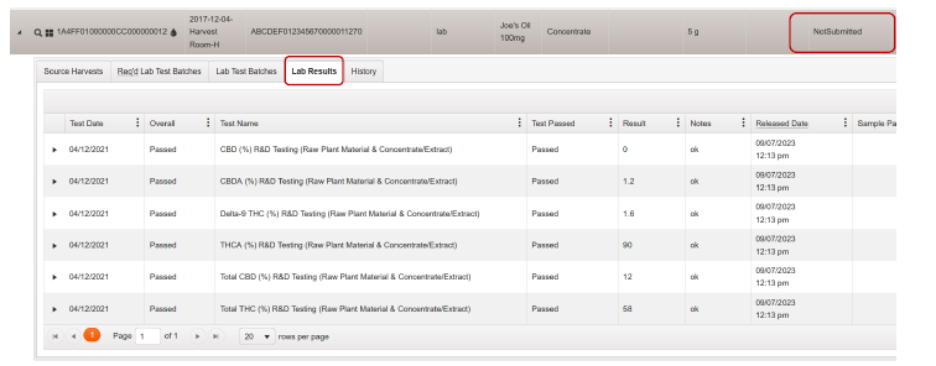
R&D Testing should be completed before state-required compliance testing.
Where to find instructions for Creating a Test Sample:
- Metrc Expert
Explore Guides & Resources > Understanding Metrc Functionality > Packages > Creating a Test Sample for step-by-step instructions.
- Metrc Learn
A course titled “Creating a Test Sample” is available. Visit https://learn.metrc.com and go to My Courses and Learning Plans to begin the course.
Best practices for avoiding mistakes
Creating a Processing Job isn’t just about moving inventory, it’s about creating a transparent, traceable record that is clear for internal auditing and meets regulatory standards. To help with internal auditing and to stay compliant as well as avoid future complications, it’s essential to follow a few key best practices. These steps will help ensure your data is complete, your processes are consistent, and your records are accurate.
Understand the transformation process
Before creating a Processing Job, ensure you have a clear understanding of the process and how your product is changing. This includes knowing the starting materials, the process being applied, and the final product category. Having this clarity will help you accurately document the transformation process in Metrc.
Maintain detailed records
Keep comprehensive records of all ingredients used in your Processing Job, including both cannabis and non-cannabis components. This documentation is crucial for compliance and can help troubleshoot any issues that may arise later.
Verify proper categorization
Ensure that both your source packages and resulting packages are correctly categorized in Metrc. Improper categorization can lead to compliance issues and inaccurate tracking throughout the supply chain.
Double-check quantities and measurements
Verify that all quantities and measurements are accurate before finalizing your Processing Job. This includes checking the weight of source packages and ensuring the resulting package quantities align with your production process.
Document production methods
When creating a Processing Job, include notes about the production methods used. This information can be valuable for both internal tracking and compliance purposes, providing context for how products were transformed.
Learning resources for Processing Jobs
To access educational materials within Metrc, click the Metrc Expert icon in Metrc to access step-by-step guides, search for topics, or live chat with the Metrc Support team. For technical assistance or account-related questions, you can also submit a case through the Metrc Support portal.
Creating accurate Processing Jobs in Metrc is a vital part of maintaining compliance in the cannabis industry. By understanding when to use the Processing Job feature and following best practices, you can ensure that your inventory tracking is efficient and accurate, helping your business stay compliant in a rapidly evolving industry.
Please note: These common errors and best practices may not apply in your state, so it is important to follow your state’s specific rules and regulations.